


But the more time we spend together, the more I liked you.
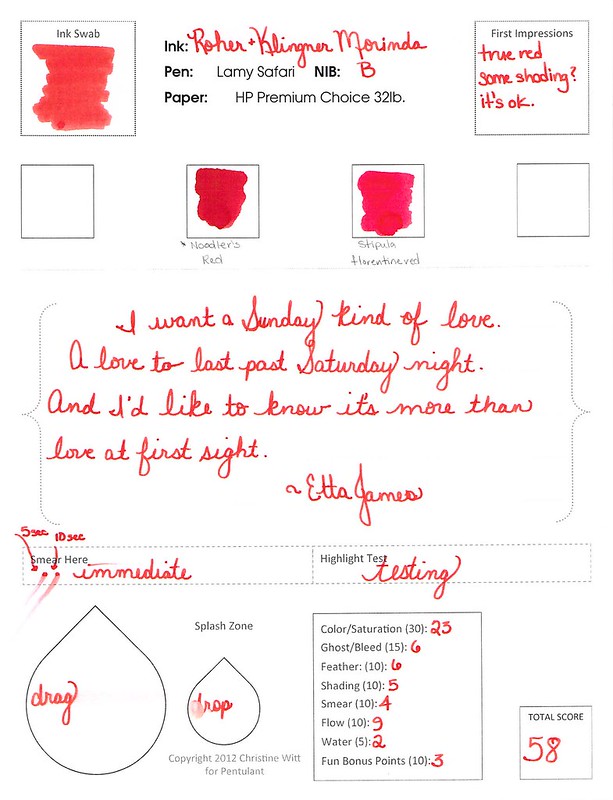
You were a bit wet in the Lamy Safari with a broad nib, but who isn’t? You were a little smeary, but I can deal with that.
But here’s the thing. You wrote great. And the water test? Holy smokes.
And you’re pretty. Oh-so-pretty. Just a tiny bit orange to make you softer than other reds. Totally different from Noodler’s Red.
The truth is, Morinda, after visiting with you for a week or so, I might be in love with you. We’ll see – I’m not quite ready to commit to just one red, but maybe…just maybe.
Love,
Pentulant
P.S. I am just about at the end of the reviews that I scanned before the highlight test – thank goodness. And, yes, I am just lazy enough that I didn’t go back and fix the issue. Haha.
Full Report https://heyanon.cc/
sitepilot.click – Navigation felt smooth, found everything quickly without any confusing steps.
экскурсия на двухэтажном автобусе в минске avtobusnye-ekskursii-po-spb.ru .
see post https://elara.cc
Сравнительный анализ предложений на рынке помогает сделать информированный выбор, ещё один обзор для Казани доступен по адресу: https://novinvest-nn.ru/2025/12/09/zilanty-seo-prodvizhenie-sajtov-v-kazani/
netvortex.click – Color palette felt calming, nothing distracting, just focused, thoughtful design.
see this site https://elara.uno
my sources https://asterdex.cc/
Continue https://elara.uno
check this site out https://cytonic.cc
reachriver.click – Overall, professional vibe here; trustworthy, polished, and pleasantly minimal throughout.
screenshot tool
The Best Screenshot Utility for Windows 10 & 11
If taking screenshots is part of your everyday work, the built-in Windows Snipping Tool quickly starts to feel limiting. Additional steps, lack of cloud uploads, no instant links, and slow interaction make it unsuitable for today’s workflows. A professional screenshot utility should be invisible, fast, and optimized around a single flow: capture, then upload and share.
This minimal screenshot tool for Windows 10 & 11 is designed precisely for this purpose. Hit PrtScn, choose any screen area, release, and the screenshot is uploaded immediately. The sharing link is placed in your clipboard automatically. No save prompts, no directories, no manual file handling.
Region capture is precise and predictable. A clear crosshair selector provides pixel-accurate selection, allowing easy capture of interface elements, code fragments, charts, or partial screens — faster and more reliable than the standard Snipping Tool.
Full-screen capture is equally straightforward. Use Shift + PrtScn to capture the entire desktop instantly. The output is a full-resolution image perfect for documentation, presentations, and bug reports, with no interruptions or popups slowing you down.
The primary benefit is immediate cloud upload. Every screenshot is uploaded automatically, and the sharing link available within milliseconds. You can paste the link directly into chats, emails, or support tickets without touching the file system or third-party image hosts.
The application runs quietly in the system tray and remains out of your workflow. RAM usage stays below 50MB, startup is immediate, with an installer that is only 2MB. Compared with heavier tools such as Greenshot, Lightshot, and ShareX, the performance and responsiveness difference is obvious immediately.
Privacy is treated properly. There are no ads, no analytics, no tracking, and no background data collection. Screenshots may contain sensitive information, and the application treats them with proper care — nothing unnecessary runs behind the scenes.
Hotkeys are fully customizable. You can assign PrtScn, Ctrl+Shift+S, or any shortcut you want, and fine-tune image quality and behavior without oversized settings or cluttered interfaces.
The built-in Windows Snipping Tool works, but it stops at capture. It offers no cloud workflow, no instant sharing, and no speed optimization. This tool serves as a replacement by focusing on what matters most: capturing data and sharing it without delay.
If you take screenshots every day — for development, support, remote work, or documentation — speed and simplicity are not optional. A modern screenshot tool should feel like a native system feature, not a standalone app.
find out this here https://badai.sbs/
pop over here https://gofundmeme.buzz/
click this https://kyros.wtf
my response https://alchemistai.buzz/
click this link now https://cytonic.cc/
over here https://hyperdrive.ink/
Hello there! This post could not be written any better! Reading this post reminds me of my good old room mate! He always kept talking about this. I will forward this post to him. Pretty sure he will have a good read. Thanks for sharing!
Click This Link https://universalx.cc/
directory https://lombard.pw/
More Info https://slop-club.org/
leadnest.click – Content reads clearly, helpful examples made concepts easy to grasp.
Услуга «нарколог на дом в Долгопрудном» от клиники «МедТрезвие Долгопрудный» создана для ситуаций, когда важно действовать быстро, аккуратно и без лишнего шума. Запой, тяжёлое похмелье, срыв после ремиссии, злоупотребление медикаментами или смесью алкоголя с препаратами — всё это не терпит откладывания и самодеятельности. Вызов врача на дом позволяет получить профессиональную помощь без госпитализации, когда состояние пациента ещё позволяет лечить его в привычной обстановке. Нарколог приезжает с полностью укомплектованным набором препаратов и расходников, проводит осмотр, подбирает капельницы по клиническим показаниям, контролирует реакцию, даёт подробные рекомендации на ближайшие дни и при необходимости предлагает дальнейший маршрут: повторный выезд, амбулаторное наблюдение или стационар клиники. Конфиденциальность соблюдается строго: без обсуждений с соседями, без регистрации по месту работы, без унизительных формальностей — только медицинская помощь, ориентированная на безопасность и результат.
Ознакомиться с деталями – vyzvat-besplatno-narkologa-na-dom
her explanation https://heyanon.lat/
http://eurotrucksimulator.phorum.pl/viewtopic.php?p=1533186#1533186
visit site https://heyanon.lat/
For innovations
is discover personal loan right
for a better outcome.
reference https://askthehive.org
my company https://exponent.bond
This design is wicked! You obviously know how to keep a reader amused. Between your wit and your videos, I was almost moved to start my own blog (well, almost…HaHa!) Excellent job. I really enjoyed what you had to say, and more than that, how you presented it. Too cool!
Homepage https://verio.buzz
Процесс организован так, чтобы снять с семьи хаос и дать понятный сценарий. После обращения в «РеутовМед Сервис» пациент быстро попадает в поле зрения врача: или через выезд по адресу, или через стационар, если состояние уже близко к опасному. На месте проводится полноценная оценка: давление, пульс, сатурация, температура, осмотр сердца и дыхания, степень обезвоживания, выраженность тремора, наличие рвоты, боли в груди или животе, неврологический статус, поведение, признаки психоза. На основе этих данных формируется индивидуальный план детоксикации. Стартовая инфузионная терапия подбирается с учётом возраста, массы тела, длительности запоя, сопутствующих болезней, уже принятых препаратов. В стационаре пациента размещают в безопасных условиях, контролируют динамику, корректируют дозировки, не оставляют «на самотёк». При выводе из запоя на дому врач остаётся до стабилизации, отслеживает реакцию и при первых тревожных признаках рекомендует стационар, а не уезжает «лишь бы поставил капельницу». Такой пошаговый подход позволяет не только снять острые симптомы, но и уменьшить риск осложнений — от аритмий и судорог до алкогольного делирия.
Выяснить больше – вывод из запоя в стационаре
view https://elara.ink/
click to find out more https://hyperdrive.my/
explanation https://upshift.cfd/
visit our website https://askthehive.xyz
экскурсия по питеру цена обзорная на автобусе экскурсия по питеру цена обзорная на автобусе .
экскурсии в санкт петербурге на автобусе двухэтажном цена экскурсии в санкт петербурге на автобусе двухэтажном цена .
look these up https://slop-club.org
Related Site https://prismagent.xyz
Hi! Do you know if they make any plugins to assist with SEO? I’m trying to get my blog to rank for some targeted keywords but I’m not seeing very good gains. If you know of any please share. Appreciate it!
my link https://xmaquina.cc/
pop over to this website https://xmaquina.org/
like it https://heyanon.pro/
click to read https://blnk.lat
more https://prismagent.agency
look these up https://blend.ad/
he said https://gofundmeme.cc/
go to website https://flaunch.ink